
How to Add Money to Royal X 777 Account?
Users can easily deposit money to their account just after creating a new account. Use the available payment options to add to menoy to your account. Royal X 777 may also refer to this process as Recharge or Add Cash. The exact payment methods, limits and verification requirements can change, so always use the options currently displayed inside your Royal X777 account. These can change with a new update. You need to follow below guide to add money to your account if you are new to this game.
Deposit Process – A step by step guide
Adding funds is normally completed through the wallet or Add Cash/Deposit section.
Step 1 – Login to RoyalX777

Open the Royal X 777 app and login to your account. Then go to the wallet section.
Step 2 – Open Your Wallet
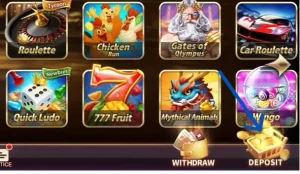
In any online game you may go to the wallet section and look for Recharge, or Add Cash. But here on RoyalX you can see a Deposit section clearly at the bottom as shown in the picture below. tap on it to continue.
Step 3 – Select an Amount
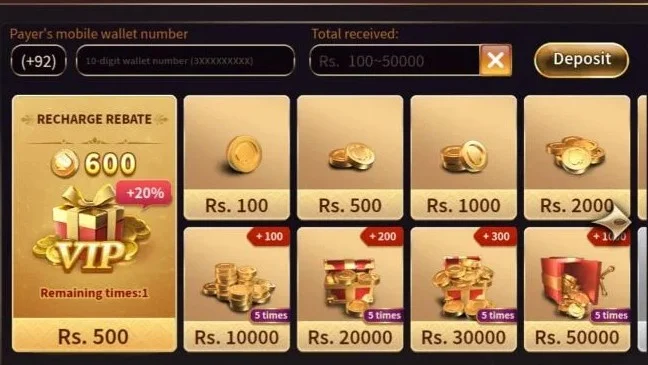
Enter or select the amount you want to add. Before confirming, check the displayed minimum and maximum limits if applicable.
Step 4 – Select a Payment Method
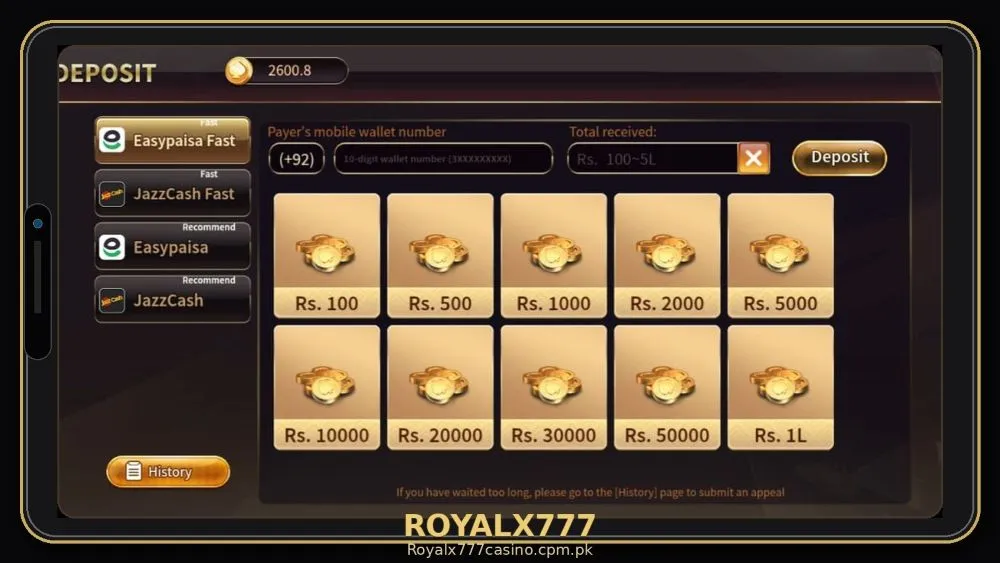
Choose one of the payment methods currently available to your account. Do not send money to an unknown person or unofficial source.
Step 5 – Complete the Payment
Follow the instructions displayed by the selected payment channel. Make sure the amount and destination details are correct before confirming a transaction.
Step 6 – Check Your Royal X 777 Balance
After completing the payment, return to your Royal X 777 account and check the wallet. Depending on the payment channel, the transaction may show as pending before the balance is updated.
What If My Deposit Is Not Showing?
A successful payment does not always mean the account balance will update immediately. First, check the transaction status.
Pending Deposit
A pending transaction may mean that the payment has not yet been confirmed by the relevant payment system.
Processing Deposit
If the transaction is being processed, allow the payment system time to complete the request.
Failed Deposit
If a deposit fails, check whether your payment account was actually charged before attempting another transaction.
Note: Avoid making repeated payments while an earlier transaction is still unresolved.
Keep Your Payment Receipt
After making a deposit, keep the transaction receipt or confirmation information until the funds appear correctly in your account. If support asks you to provide transaction information, use the official support channel and provide only the information necessary to identify the payment.
Important Royal X 777 Deposit Safety Tips
Before making a deposit:
- Confirm that you are logged into the correct account.
- Check the amount carefully.
- Use only payment methods displayed by your account.
- Keep your payment confirmation.
- Never share your account password.
- Do not send money to unofficial individuals claiming to be agents.
- Do not make a second payment simply because the first one is delayed.
- Check the applicable terms and transaction conditions.
- Ask for help from live chat if payment not recieved.
- Don’t make duplicate transactions.
- Always check the account details before making transaction.
- Read the message or notice carefully in your Easypaisa or Jazzcash then conform payment.
FAQ’s?
Responsible Disclaimer
Royal X 777 involves games where money may be at risk. Don’t make a habit of playing the game regularly. Understand game rules before making any transaction, then start playing and comply with the local laws.